Product Details
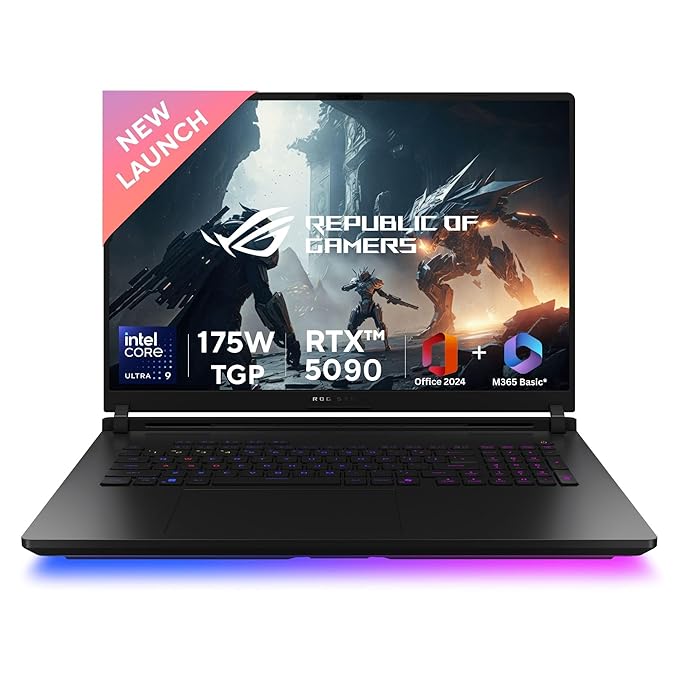
ASUS ROG Strix SCAR 18,Intel Core Ultra 9 275HX Gaming Laptop(NVIDIA RTX 5090-24GB/175W TGP/64GB/2TB/2.5K QHD+/18"/240Hz/Windows 11/M365
₹449,990.00
₹500,999.00
Save ₹51,009.00 (10%)
Description
Brand ASUS
Model Name ROG Strix SCAR 18
Screen Size 18 Inches
Colour Off Black
Hard Disk Size 2 TB
CPU Model Intel Core Ultra 9
RAM Memory Installed Size 64 GB
Operating System Windows 11 Home
Special Feature 1080P FHD IR Camera for Windows Hello, Anti-glare display, ROG Nebula HDR Display, ROG intelligent cooling1080P FHD IR Camera for Windows Hello, Anti-glare display, ROG Nebula HDR Display, ROG intelligent cooling
Graphics Card Description Dedicated
About this item
Features: Tool-less design, Full Surround Aura RGB, Conductonaut Extreme Liquid Metal on CPU & GPU.
Processor : Intel Core Ultra 9 Processor 275HX 2.7 GHz (36MB Cache, up to 5.4 GHz, 24 cores, 24 Threads); Intel AI Boost NPU up to 13TOPS
Display : 18-inch, 2.5K (2560 x 1600, WQXGA) 16:10 aspect ratio, 240Hz Refresh Rate, 1200nits Brightness | Keyboard : Backlit Chiclet Keyboard Per-Key RGB with Copilot key
Memory : 64GB DDR5 RAM | SSD : 2TB PCIe 4.0 NVMe M.2 Performance SSD
Graphics : NVIDIA GeForce RTX 5090 Laptop GPU, 24GB GDDR7 RAM, Graphic Wattage : ROG Boost: 1647MHz* at 175W (1597MHz Boost Clock+50MHz OC, 150W+25W Dynamic Boost)
【Software : Microsoft 365 Basic with 100GB Cloud Storage for 1 Year + Office Home 2024 with lifetime validity | Operating System : Windows 11 Home】
On board Wireless : Wi-Fi 7(802.11be) (Triple band) 2*2+Bluetooth 5.4 Wireless Card (*Bluetooth version may change with OS version different.)
I/O Ports : 1x 2.5G LAN port, 2x Thunderbolt 5 with support for DisplayPort / power delivery / G-SYNC (data speed up to 120Gbps), 3x USB 3.2 Gen 2 Type-A (data speed up to 10Gbps), 1x HDMI 2.1 FRL ( Display Output)
Battery : 90WHrs, 4S1P, 4-cell Li-ion, Fast Charging : Recharge from 0-50% in 30 minutes
Web Cam : 1080P FHD IR Camera for Windows Hello, Mic : Built-in array microphone, Audio : 1x 3.5mm Combo Audio Jack, 4-speaker system with Smart Amplifier Technology
Key Features
- Genuine OEM Part
- Easy Installation
- 1 Year Warranty
- Free Shipping
- 30-Day Return Policy
Free Shipping
Delivery in 3-5 business days
1 Year Warranty
Manufacturer warranty included
Product Description
Brand ASUS
Model Name ROG Strix SCAR 18
Screen Size 18 Inches
Colour Off Black
Hard Disk Size 2 TB
CPU Model Intel Core Ultra 9
RAM Memory Installed Size 64 GB
Operating System Windows 11 Home
Special Feature 1080P FHD IR Camera for Windows Hello, Anti-glare display, ROG Nebula HDR Display, ROG intelligent cooling1080P FHD IR Camera for Windows Hello, Anti-glare display, ROG Nebula HDR Display, ROG intelligent cooling
Graphics Card Description Dedicated
About this item
Features: Tool-less design, Full Surround Aura RGB, Conductonaut Extreme Liquid Metal on CPU & GPU.
Processor : Intel Core Ultra 9 Processor 275HX 2.7 GHz (36MB Cache, up to 5.4 GHz, 24 cores, 24 Threads); Intel AI Boost NPU up to 13TOPS
Display : 18-inch, 2.5K (2560 x 1600, WQXGA) 16:10 aspect ratio, 240Hz Refresh Rate, 1200nits Brightness | Keyboard : Backlit Chiclet Keyboard Per-Key RGB with Copilot key
Memory : 64GB DDR5 RAM | SSD : 2TB PCIe 4.0 NVMe M.2 Performance SSD
Graphics : NVIDIA GeForce RTX 5090 Laptop GPU, 24GB GDDR7 RAM, Graphic Wattage : ROG Boost: 1647MHz* at 175W (1597MHz Boost Clock+50MHz OC, 150W+25W Dynamic Boost)
【Software : Microsoft 365 Basic with 100GB Cloud Storage for 1 Year + Office Home 2024 with lifetime validity | Operating System : Windows 11 Home】
On board Wireless : Wi-Fi 7(802.11be) (Triple band) 2*2+Bluetooth 5.4 Wireless Card (*Bluetooth version may change with OS version different.)
I/O Ports : 1x 2.5G LAN port, 2x Thunderbolt 5 with support for DisplayPort / power delivery / G-SYNC (data speed up to 120Gbps), 3x USB 3.2 Gen 2 Type-A (data speed up to 10Gbps), 1x HDMI 2.1 FRL ( Display Output)
Battery : 90WHrs, 4S1P, 4-cell Li-ion, Fast Charging : Recharge from 0-50% in 30 minutes
Web Cam : 1080P FHD IR Camera for Windows Hello, Mic : Built-in array microphone, Audio : 1x 3.5mm Combo Audio Jack, 4-speaker system with Smart Amplifier Technology
Compatibility
- Compatible with major laptop brands
- Easy plug-and-play installation
- Tested for optimal performance
Technical Specifications
| Brand | LapDesk Parts |
|---|---|
| Model | LDP-0011 |
| Compatibility | Multiple Laptop Models |
| Warranty | 1 Year |
| Condition | New |
Customer Reviews
John D.
Excellent product! Easy to install and works perfectly with my laptop.
Posted on January 15, 2024
Installation Guide
1
Safety First
Turn off your laptop and disconnect all power sources before starting the installation.
2
Remove Old Part
Carefully remove the old component following the manufacturer's guidelines.
3
Install New Part
Install the new part in the same position, ensuring all connections are secure.
4
Test Functionality
Reconnect power and test the new component to ensure proper functionality.
Video Tutorial
Watch our step-by-step installation guide